

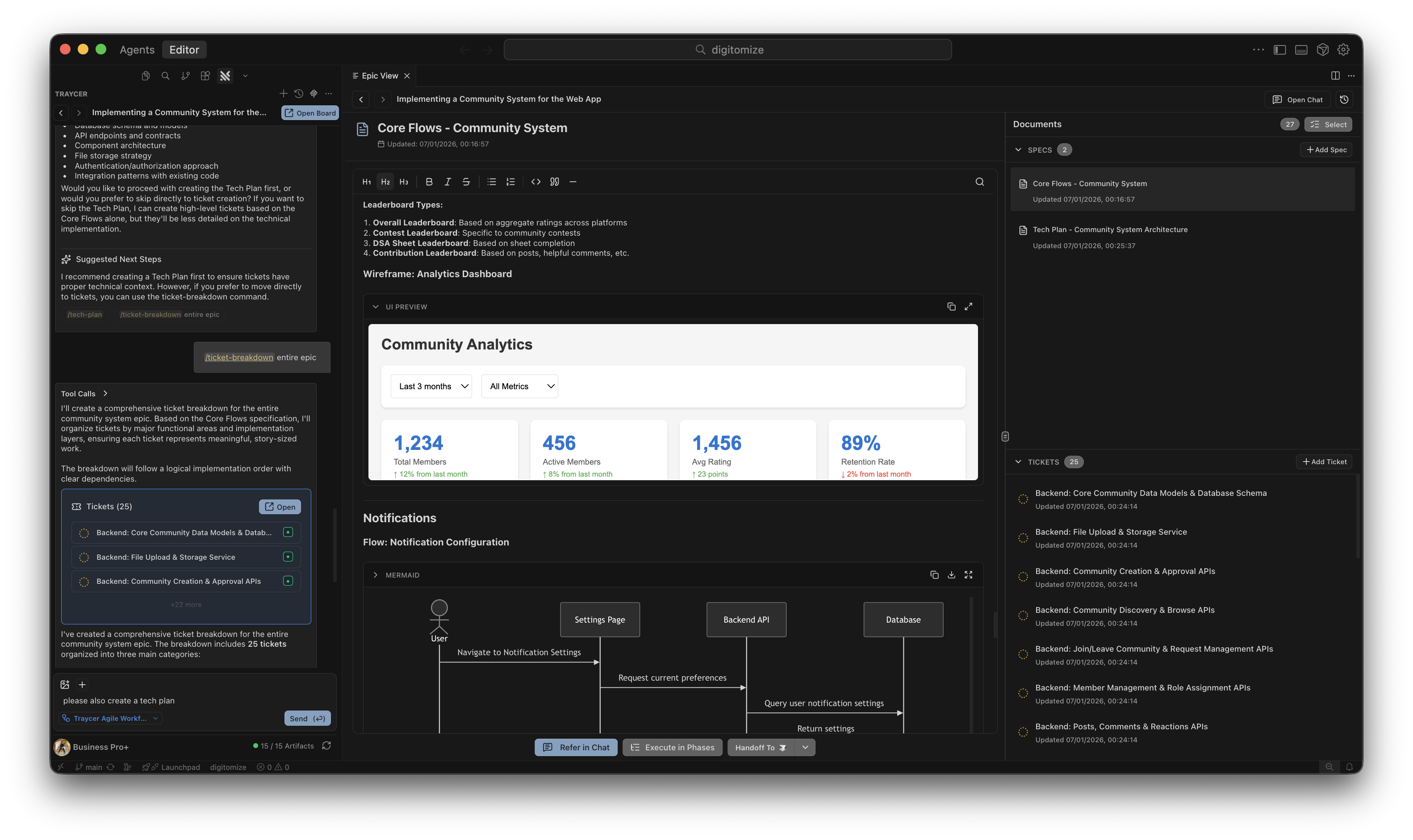
Understanding Artifacts
Epic Mode helps you create and manage artifacts - structured documents that form a system of interconnected specs and tickets. This system captures your development process from requirements to implementation. Artifacts come in two types:Specifications (Specs)
Specs are focused, high-level documents that capture requirements, design decisions, and technical planning. They provide the “why” and “what” of your project. Rather than one giant spec, Epic Mode favors mini-specs - each tightly scoped to a specific aspect, making them easier to maintain and update as your project evolves. Common spec types:- PRD (Product Requirements Document): Defines the problem, who’s affected, and the desired outcome at a product level
- Tech Doc: Outlines architecture, technical approach, and implementation strategy
- Design Spec: Documents user flows, UX decisions, and interaction patterns
- API Spec: Defines API contracts, endpoints, and integration requirements
Tickets
Tickets are actionable work items that break down specs into concrete implementation tasks. Each ticket represents a focused unit of work that can be independently implemented. Ticket characteristics:- Contains clear acceptance criteria
- Tracks status: Todo → In Progress → Done
- Can be assigned to specific collaborators or left Unassigned
- Can be handed off to coding agents for implementation
Full Context Awareness: All specs and tickets within an epic are automatically in the LLM’s context. When you’re discussing a ticket or spec, the AI has full awareness of all related artifacts, previous decisions, and conversations - enabling coherent, context-aware development throughout your entire epic.
How It Works
1
1. Choose a Workflow
Select a workflow that will guide you through the development process with structured commands.Learn more about workflows.
2
2. Start with Requirements
Provide your requirements, problem statement, or goals to the workflow’s entrypoint command.The AI begins processing according to the workflow’s instructions.
3
3. Follow the Workflow
Progress through the workflow’s commands. Epic Mode emphasizes dialogue and elicitation - the AI doesn’t just generate documents, it actively asks pointed questions to surface constraints, edge cases, and the “invisible rules” behind your requirements.During this process, the AI will:
- Ask clarifying questions to understand your intent deeply
- Help you make explicit decisions instead of leaving ambiguity
- Propose and create specification documents
- Generate actionable tickets for implementation
- Guide you through additional workflow-specific steps
4
4. Handoff to Implementation
Once you have the specs and tickets you need, select them and hand off for implementation. Verification is built into Traycer’s implementation modes to continuously validate that execution matches your captured intent.See Selection and Handoff for details on the available options.
Executions
Executions provide complete visibility into every agent handoff within your Epic. Each execution represents a discrete unit of work sent to a coding agent, capturing the full lifecycle from handoff to completion.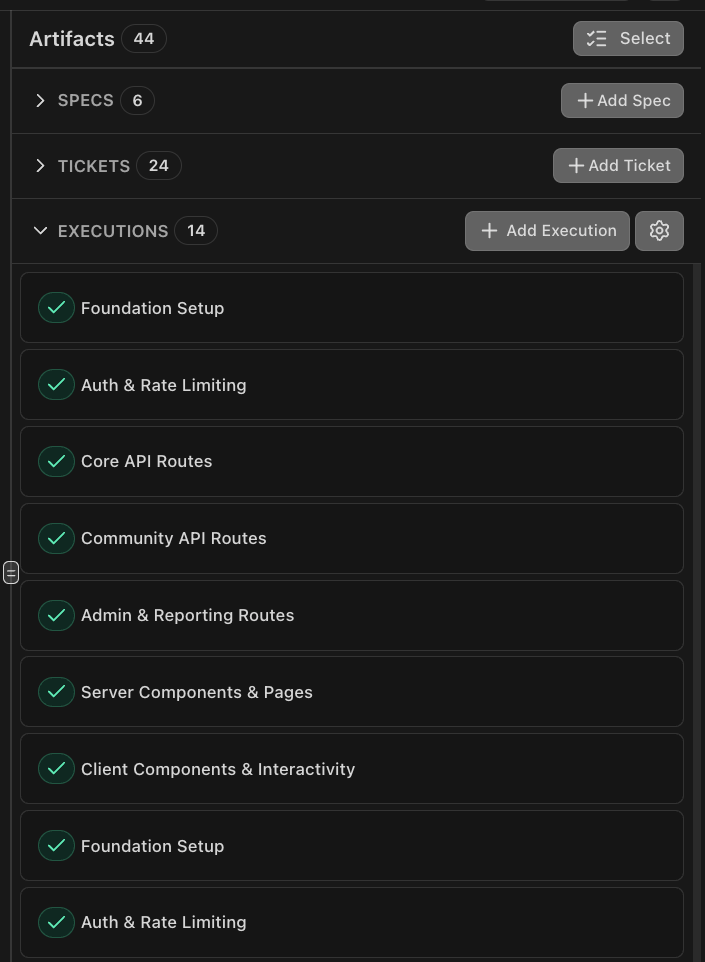
What Gets Tracked
Every execution captures:- Plans: Implementation plans generated (if any) during execution
- Verification Comments: Post-execution verification results with any review comments or issues found
- Commit: Git commit created after successful execution
- Status: Current state of the execution (running, completed, verification pending, etc.)
Viewing Executions
All executions are visible directly in the Epic view:- Execution History: See every handoff that’s occurred, both manual and automated
- Execution Details: Click into any execution to see the full context, what was handed off, and verification results
- Real-time Updates: Watch executions progress as agents work
Smart YOLO
Smart YOLO is Traycer’s intelligent orchestrator that can execute entire Epics end-to-end with minimal human intervention. Simply use the/execute command or tell Traycer to execute your specs and tickets, and Smart YOLO takes over - automatically coordinating execution, verification, and iterative refinement until your Epic is complete.
What makes it “smart”: Unlike traditional automation, Smart YOLO dynamically adjusts its execution strategy at runtime. It analyzes each spec and ticket, then intelligently configures every aspect of execution - from selecting the right agents and templates to determining whether to skip planning, which verification levels to address, appropriate timeouts, and whether to auto-commit. Every setting is optimized for the specific task at hand.
Smart YOLO is ideal when you have well-defined specs and tickets ready for implementation and want intelligent automated execution with minimal manual coordination.
For full documentation on Smart YOLO features and all dynamic configuration capabilities, see YOLO Mode.
Managing Specs and Tickets
Epic mode provides comprehensive artifact management capabilities. All specs and tickets are organized in the Documents panel on the side, where you can view, select, and manage them.Specs
- Create: Generate specs through AI-assisted conversations or use the + Add Spec button
- View & Edit: Select any spec from the list to view and edit its contents
- Organize: All specs are grouped in the SPECS section of the Documents panel
Tickets
- Create: Break down work into actionable tickets or use the + Add Ticket button
- View & Edit: Select any ticket from the list to view and edit its contents
- Status Tracking: Track ticket status from Todo → In Progress → Done
- Assignment: Assign tickets to specific collaborators or leave them Unassigned
- Organize: All tickets are grouped in the TICKETS section of the Documents panel
Selection and Handoff
Use the Select button to enter selection mode and choose specific specs and tickets. Once selected, you can:- Refer in Chat: Reference selected artifacts in conversation
- Execute in Phases: Hand off to Phases mode for implementation
- Handoff To: Send to your preferred coding agent
Collaboration
Epic boards can be shared with your team so everyone works from the same set of specs and tickets. Share boards with teammates, assign tickets to specific collaborators, and work together in real time with live updates and presence indicators. Key collaboration features:- Invite by email or GitHub handle - Add collaborators individually or share with your entire organization
- Assign tickets - Distribute work across team members directly from the ticket view
- Real-time editing - Multiple people can edit specs and tickets simultaneously with live updates
- Access control - Set Editor or Viewer permissions based on each person’s role
Open Board in the top bar to get started.
📖 For detailed guides on inviting team members, ticket assignment, access levels, best practices, and use cases, see the Collaboration documentation.